55 Inch 4K HD Touch Screen Android Windows Indoor Floor-Standing Transparent OLED Screen
55 Inch Floor-Standing Transparent OLED Kiosk for Indoor Interactive Services
The 55 Inch 4K HD Touch Screen Android Windows Indoor Floor-Standing Transparent OLED Screen is designed for projects that need a self-contained digital service point without introducing a large opaque display into the space. It combines transparent OLED presentation, touchscreen interaction and a floor-standing structure for use in retail stores, museums, exhibitions, corporate lobbies and public information areas.
Its primary SEO reference, 55-inch Transparent OLED Kiosk, accurately reflects how buyers are likely to evaluate the product. It is not simply a transparent television. It is a visitor-facing system that must coordinate hardware, software, content, placement and daily operation.
When used effectively, the screen can present navigation, product information, interactive demonstrations or visitor instructions while keeping the surrounding architecture or featured object visible.
Where a Transparent OLED Kiosk Creates Value
A floor-standing transparent display is most useful when people need information at a defined point in their journey. It may be positioned beside a product collection, near an exhibition entrance, within a reception area or along a visitor route.
Suitable applications include:
- Interactive retail catalogs
- Museum and exhibition guidance
- Corporate lobby information
- Product configuration tools
- Multilingual visitor services
- Event registration and navigation
- Guided sales presentations
- Smart building directories
The transparent format allows the kiosk to remain visually lighter than conventional digital signage. In premium interiors, this can help the display feel integrated with the environment instead of appearing as a black rectangular structure when content is limited.
Transparency should still serve a practical purpose. Before selecting the product, the project team should define what visitors need to see behind the display and how the digital layer will improve that view.
Android or Windows: Selecting the Operating Platform
Support for Android or Windows gives integrators flexibility, but the final operating system should be selected according to the application rather than personal preference.
Android may suit streamlined digital signage, looping media, lightweight touch applications and centrally managed content. It can be practical for installations that need a simplified operating environment and repeatable deployment across multiple locations.
Windows may be more appropriate for custom applications, product configurators, corporate software, sensor integration or programs that require broader peripheral compatibility. It can also support complex interactive content, although maintenance, security updates and restart procedures may require more active management.
| 55 Inch Transparent OLED Floor-Standing Display |
| LCD Panel Parameters |
| Screen Size |
55 inch |
| Panel type |
OLED |
| transmittance |
40%(Typ.) |
| Max Resolution |
1080×1920 |
| Aspect Ratio |
16:9 |
| Brightness |
600/200 cd/m2 |
| Contrast Ratio |
150000:1 |
| Viewing angle(up/down/left/right) |
R/L 178°(Min.), U/D 178°(Min.) |
|
| Response Time |
0.1ms(Gray To Gray) |
| Display color |
1.07B(10bit) |
|
| Onboard interface |
| port |
HDMI IN*1, DP IN*1, RJ45(RS232) IN*1, RJ45(RS232) OUT*1,USB*1 |
|
| Touch Method |
| Capacitive Touch screen(Optional) |
Default 10 points Capacitive Touch |
| Power Specifications |
| Power supply |
100-240V~, 50/60Hz |
|
| Total System Power Consumption |
≈85W System Not Included |
|
| Machine Operating Parameters |
| running time |
7*12h |
| Screen life |
30000h |
| Operating temperature |
0℃~40℃ |
| working humidity |
20%~80% |
| structure |
| Material |
Aluminum+Tempered Glass+Metal |
| external dimensions |
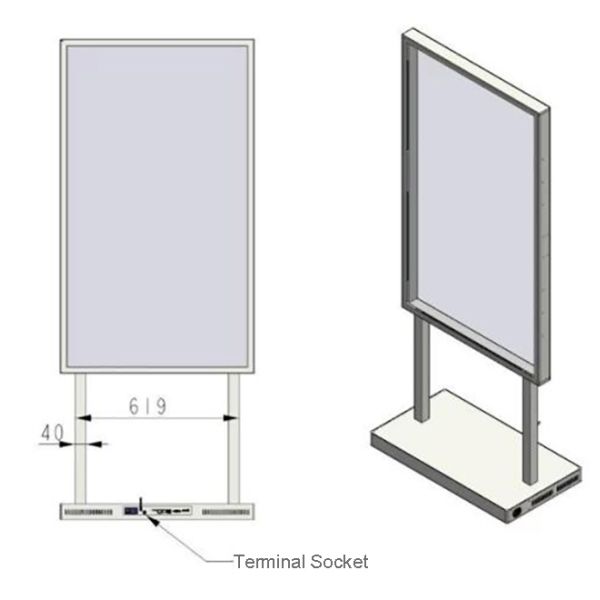
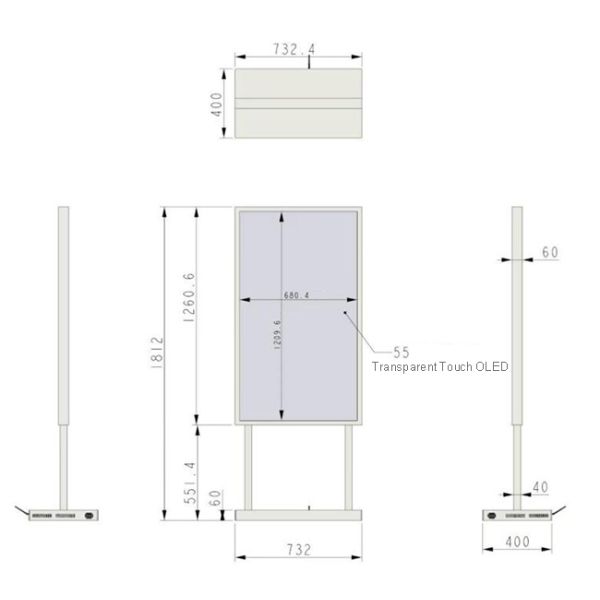
732mm×400mm×1812mm Refer to the structural dimension drawings. |
| Package size |
832mm×500mm×1900mm |
|
| Installation Method |
Base Installation |
| Net weight |
45KG |
| Accessories |
| Power Cord,Remote Control |
| other |
| After-Sales Service |
1-Year Warranty |
Questions to Confirm Before Choosing
The buyer should establish:
- Which application will run on the kiosk
- Whether internet access is required
- Who controls software updates
- How the system returns to its home screen
- Whether remote support is available
- Which input devices or sensors will be connected
- How staff can restart the application safely
The operating system, processor, memory and storage configuration should be confirmed in the quotation. If the product is marketed as a 4K display, buyers should also verify the panel’s native resolution separately from the maximum media input resolution.
Creating Content for Transparent OLED
Transparent OLED content should be created around the physical environment. Conventional full-screen advertising can reduce the visual benefit of the technology, especially when large opaque backgrounds cover most of the panel.
A more effective design uses bright focal graphics, concise text and generous open space. Product labels, arrows, diagrams and restrained animation can appear to float in front of the background. Darker areas of the media can visually recede, helping the physical scene remain part of the presentation.
The interface should make the first action immediately clear. Visitors passing through a public area may only give the kiosk a few seconds of attention. Large buttons and short decision paths are therefore more useful than dense menus.
For guided sales or museum applications, deeper information can be introduced after the visitor selects a topic. A visible home button and an automatic reset timer help prepare the interface for the next user.
Floor Placement and Accessibility
A floor-standing kiosk needs more planning than simply identifying an available area. The project team should evaluate pedestrian flow, screen height, touch reach, viewing angle and base stability.
The display should not obstruct emergency routes, merchandise access or staff movement. Its base must remain stable during repeated touch interaction, particularly in unsupervised public environments. Where required, the design should include an appropriate anchoring or anti-tip solution.
Power and network cables should be concealed or protected against accidental movement. The enclosure must also provide ventilation and access to the media player, controller and power components.
Maintenance and Content Ownership
Every transparent OLED kiosk needs a named content and system owner. This person or team should be responsible for publishing updates, checking playback, managing software and responding to operating problems.
Frequently changing information may be delivered through a CMS or remote management platform. Product configurators and custom interactive applications may require a Windows-based workflow, while simpler promotions can often be managed through Android signage software.
Cleaning is especially important because fingerprints can weaken both the touch experience and transparent presentation. The supplier should provide approved cleaning instructions for the screen and protective glass.
Service access must remain available after installation. Controllers, cables and computing components should be replaceable without dismantling the complete kiosk body.
Procurement Recommendation
The 55-inch Transparent OLED Kiosk is a strong option when a project needs indoor touchscreen interaction while preserving visual continuity with the surrounding environment. It can support retail consultation, visitor guidance, exhibition interpretation and premium self-service applications.
Before ordering, confirm the native resolution, Android or Windows configuration, touch technology, base stability, connectivity, remote-management method and maintenance access. A site test with real content is also recommended. When hardware, interface design and physical placement are planned together, the kiosk can become a useful service point rather than merely an attention-grabbing transparent screen.
If you would like to get the specification about above product, or you hope to discuss your requirements or need any additional information on our this product , then please do not hesitate to send us a inquiry and contact our sales team now.


