Factory Direct 55 Inch Embedded Transparent OLED Touch Screen for Smart Retail & Interactive Display
55 Inch Embedded Transparent OLED Touch Panel for Custom Retail Fixtures
The 55 Inch Embedded Transparent OLED Touch Screen for Smart Retail and Interactive Display is intended for projects where the display must become part of the fixture rather than sit in front of it. For system integrators, its value lies in combining a transparent digital layer, touch interaction and a clean embedded installation without hiding the merchandise or physical environment behind the screen.
The primary keyword, 55-inch Transparent OLED Panel, reflects its role in the purchasing process. Buyers are not selecting a complete television for general viewing. They are sourcing a display component that must work with custom furniture, protective glass, controllers, software, lighting and service access.
This format can support retail product exploration, museum interpretation, interactive showrooms and branded installations where a conventional screen would interrupt the spatial design.
Why Choose an Embedded Transparent OLED Panel?
An embedded installation gives architects and fixture designers more control over the final appearance. The visible panel can be incorporated into a wall opening, product cabinet, consultation table or exhibition structure while cables and control equipment remain conceaLCD.
The transparent screen allows digital labels, product comparisons, animation and interface controls to appear in front of a real object. Customers can view the merchandise and access additional information without shifting their attention to a separate monitor.
Potential applications include:
- Interactive retail furniture
- Product comparison counters
- Museum interpretation displays
- Premium showcase installations
- Corporate demonstration tables
- Smart showroom fixtures
- Exhibition information stations
- Custom architectural media surfaces
The technology is most effective when the physical background has a defined role. If the area behind the panel contains no meaningful object or design feature, the transparent format may provide limited practical advantage.
Integration Begins with the Mechanical Drawing
A transparent OLED panel should not be added after the fixture has already been manufactured. The display, touch layer and supporting structure need to be coordinated during the design stage.
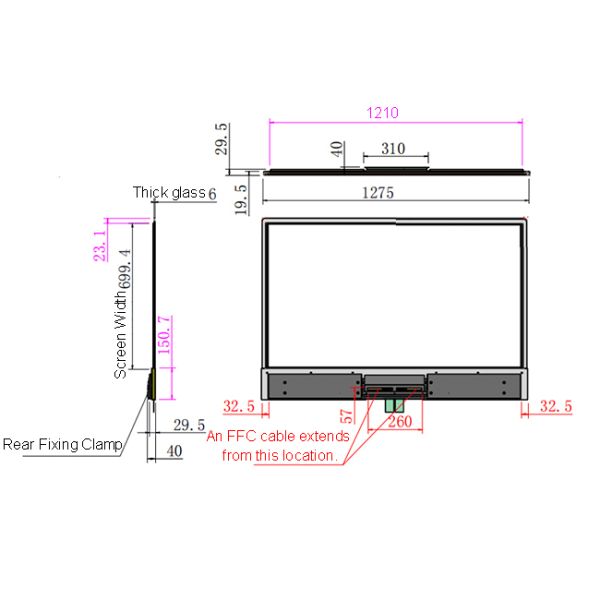
The mechanical drawing should identify the active display area, external panel dimensions, mounting points, allowable tolerances and protected edges. OLED panels require careful handling, and pressure from an uneven frame can introduce avoidable risk.
Key Integration Details
System integrators should confirm:
- Panel orientation and active viewing area
- Frame and enclosure tolerances
- Touch-glass construction
- Controller and media-player location
- Power and signal routing
- Ventilation and heat dissipation
- Access for cable replacement
- Removal procedure for future service
The supporting structure must protect the panel without covering too much of the transparent area. If decorative trim or protective glass is required, its optical and touch performance should be tested as part of the complete assembly.
|
55-inch embedded OLED transparent screen
|
|
Panel size
|
55 inches.
|
Panel type
|
OLED
|
|
display area
|
1209.6 X 680.4mm
|
external dimensions
|
1221.5Mm × 699.35mm × 1.78mm (width × height × thickness)
|
|
transmittance
|
43%
|
viewing angle
|
178 °, 178 °
|
|
static contrast
|
100000:1 (Typ.) Transmission
|
Dynamic Contrast
|
200000:1 (Typ.) Transmission
|
|
patchwork
|
Unilateral 5.9mmm, bilateral 12mm, overall unilateral stitching 5.9/5 9/5.9/13 (left/right/top/bottom)
|
screen scale
|
16:9
|
|
brightness
|
200-600 (nits)
|
Best resolution
|
1920*1080
|
|
Screen life
|
≥ 30000 hours
|
power
|
≤ 190W
|
|
Display color
|
10-Bit, 1.07B (1B = 1 billion)
|
Speaker
|
8Ω/5W * 2
|
|
screen gross weight
|
Screen weight 2.4kg
|
Gross weight of the whole machine
|
to be determined
|
|
environment
|
Working temperature 1 ℃~ 45 ℃
|
working humidity
|
30%~80%
|
|
running time
|
18 hours x 7 days
|
Ambient height
|
(Altitude) 0~ 5000m
|
|
response time
|
8ms
|
working voltage
|
100V-240VAC, 50/60Hz
|
|
Fitting method
|
frame sticker
|
Fitting method (optional)
|
Full fit
|
|
Driver Board
|
|
input interface
|
HDMI IN
|
USB
|
USB 2.0
|
|
DP
|
DP IN
|
weight
|
0.4Kg
|
|
Control signal IN
|
RS232 serial port (RJ45)
|
Control signal OUT
|
RS232 serial port (RJ45)
|
|
function
|
With splicing function
|
protect
|
Anti-afterimage, anti-burn, repair function
|
|
Touch screen parameters: capacitance optional
|
|
touch technology
|
Capacitive touch technology
|
positioning accuracy
|
3Mm
|
|
Installation method
|
Built-in integrated
|
writing method
|
Finger ≥ 5mm
|
|
touch points
|
10 touch writing
|
Writing screen medium
|
5-8Mm tempered high transparency glass
|
|
response speed
|
≤ 5ms
|
computer driven
|
drive-free
|
|
mode of communication
|
USB
|
service life
|
≥ 60 million times
|
|
PC configuration (optional)
|
|
main board
|
Intel Core
|
|
CPU
|
4th generation/6th generation/7th generation/8th generation/10th generation - Core i3/i5/i7 (optional)
|
|
Memory
|
4G/8G/16G-DDR3 (optional)
|
|
Hard disk
|
SSD120G/240G/480-HDD500G/1T/2T (optional)
|
|
nuclear display
|
Intel HD Graphics 4000
|
|
Backplane I/O
|
1 × DC_IN power interface, 1 × HDMI interface, 1 × VGA interface, 2 × USB3.0 interface, 1 × LAN_RJ interface, 2 × USB2.0 interface, 1 × Mic (input), 1 × PHONE (output)
|
|
Operating System
|
Win 7/Win 10 operating system
|
|
Android configuration (optional)
|
|
Main board model
|
3568/3288/3588
|
|
Memory
|
2G/4G/8G optional
|
|
storage
|
16G/32G/64G/128G optional
|
|
interface
|
1 × USB2.0, 1 × USB3.0, 1 × DC_IN, 1 × HDMI_OUT, 1 × LAN_RJ, 1 × WIFI, 1 × 3.5 headphone socket, 1 × TFT socket
|
|
Packing and packing list
|
|
Package size
|
Honeycomb box: 140 * 37 * 93CM
|
Air box:/
|
|
Weight information
|
Bare metal weight: 40KG
|
Packing weight (bare metal + honeycomb box): 53KG
|
|
name
|
With PC/Android
|
|
|
Specifications
|
quantity
|
Remarks
|
|
transparent display
|
55 inch OLED transparent screen
|
1 piece
|
|
|
system
|
Customized according to actual needs (built-in)
|
1 set
|
|
|
remote control
|
Universal version (without battery)
|
1
|
|
|
Power cord
|
National standard 1.5 meters
|
Article 1
|
|
|
HDMI extension cable Note ②
|
optional
|
Article 1
|
|
|
Touch the USB extension cable Note ②
|
optional
|
Article 1
|
|
|
HDMI signal cable Note ②
|
optional
|
Article 1
|
|
|
Warranty card certificate
|
Chinese version
|
1 sheet
|
|
|
Note: HDMI extension cable, HDMI cable and touch USB extension cable are optional items. The final packing list is subject to the actual shipment of the customer. You can choose whether to configure the extension cable according to customer needs. Note that the selection will incur corresponding costs. Please confirm the price for shipment.
|
Planning the Capacitive Touch Experience
Touch integration changes both the physical construction and the software workflow. The user interface should be designed for the actual mounting height, viewing distance and visitor behavior.
A retail customer standing at a product counter may need fast access to colors, specifications, availability or comparison tools. A museum visitor may follow a guided story with diagrams, timelines and multiple language options. These two situations require different menu structures even when they use the same display hardware.
Buttons should be large, labels concise and navigation predictable. Public installations also need an automatic return to the home screen after inactivity. The project team should test touch accuracy near the edges, response during repeated use and compatibility with the final protective glass.
Software ownership must be established before handover. The integrator should document who maintains the application, who publishes content and how store employees can restart the system.
Content Made for a Transparent Surface
Media for transparent OLED should preserve the connection between the digital layer and the object behind it. Full-screen opaque graphics can make the installation behave like a conventional display and reduce the reason for selecting transparent technology.
A more effective composition uses open space, bright focal elements and short supporting text. Floating labels can identify product details, while restrained animation can direct attention toward a physical feature. Darker portions of the media can recede visually, helping the background remain visible.
Content should be tested against the actual fixture materials. A bright product, reflective shelf or patterned wall can change the readability of graphics that appeared clear during software development.
Lighting and Background Control
The viewing environment has a direct influence on transparent-display performance. Store spotlights, glass reflections, illuminated shelves and nearby windows can compete with the on-screen image.
Integrators should conduct a site test using the proposed content and real approach angles. If readability is insufficient, the solution may involve adjusting the background illumination, simplifying the content or adding controlLCD contrast zones.
Increasing screen brightness alone does not solve every problem. The best result usually comes from coordinating media design, object lighting and the surrounding interior.

Content Management and Connectivity
The media platform should match the frequency and complexity of updates. An Android player may suit simple catalogs and campaign loops, while a Windows system may be preferable for custom interactive applications. A CMS can support remote scheduling across multiple stores.
Before commissioning, confirm the required inputs, network connection, supported resolution and remote-control method. The system should also include a recovery process in case the application, player or network becomes unavailable.
Maintenance Behind the Fixture
Service access is one of the most important differences between a demonstration unit and a dependable commercial installation. Controllers, cables and computing hardware should remain reachable without removing the entire wall or cabinet.
The handover documentation should cover screen cleaning, ventilation inspection, software updates and component replacement. Approved cleaning materials are particularly important for a public touch surface.
Procurement Recommendation
The 55-inch Transparent OLED Panel is well suited to custom indoor projects that require interactive digital content without concealing a product, exhibit or architectural background. Its success depends less on the novelty of the transparent screen and more on the quality of the complete integration.
Before ordering, obtain confirmed mechanical drawings, touch specifications, interface details, controller requirements and service instructions. When the enclosure, lighting, content and maintenance plan are developed together, the embedded transparent OLED panel can deliver a refined interactive installation that feels native to the surrounding space.
If you would like to get the specification about above product, or you hope to discuss your requirements or need any additional information on our this product , then please do not hesitate to send us a inquiry and contact our sales team now.


